

Learning Center
3 minEasyUpdated on 12/12/2025
How to Make Your Inventory Public
Learn how to set your Steam inventory to public in a few simple steps.
Why is this important?
To sell your skins on CubeSKINs, your Steam inventory needs to be set to public. This allows our system to view your skins and make an accurate valuation.
Step by Step
1
2
Find inventory privacy
Find the option titled "Inventory privacy:" and click "Private".
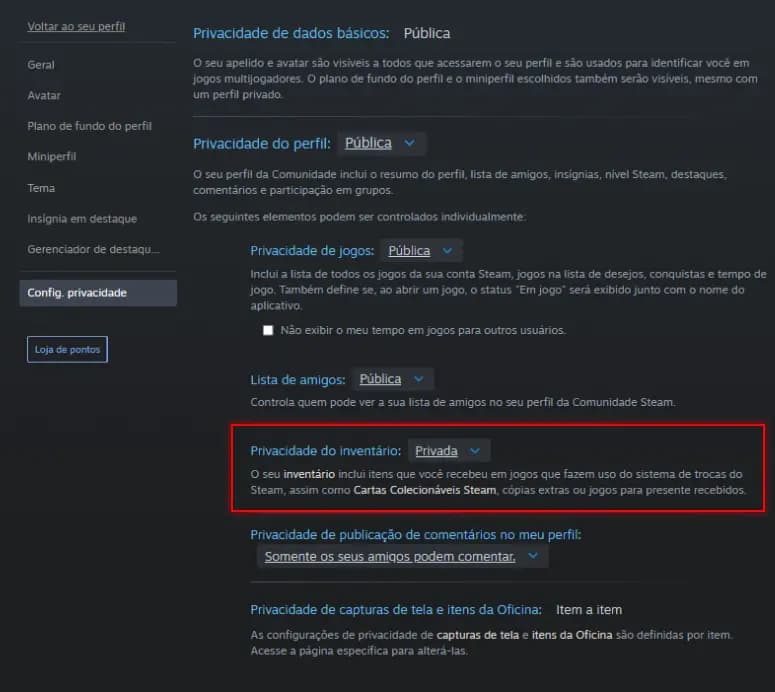
3
Privacy Settings
In the menu that appears, select "Public".
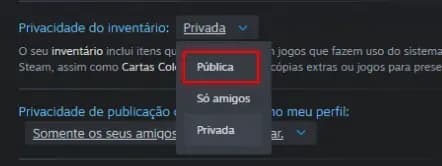
Make sure "Profile privacy:" is also set to "Public", otherwise the "Public" option won't appear above.
Verify Settings
To confirm your inventory is public, use this button:
Support
Still have questions?
Our team is available to help you with any problem.
Talk to Support